Did you know that the list of available apps in the App Store depends directly on the region set in your Apple ID? Sometimes the most necessary applications — for example, TikTok, VPN clients, or messengers — simply don’t appear in the store due to regional restrictions. Fortunately, you can bypass these blocks by simply changing the country in your account settings or creating a new Apple ID with a different region. Below we’ll explain how to do this and what points to consider.
Why might apps be unavailable in your region?
Different countries restrict access to apps for different reasons — from national security to cultural norms. Here are some examples:
- TikTok — banned in India, restricted in some Middle Eastern countries, and threatened with a ban in the US. The reason is security concerns and data protection issues.
- WhatsApp — blocked in the UAE and Iran due to message encryption policies and communication control requirements.
- Adult apps — such as Pornhub, XVideos, and others are blocked in India, Pakistan, the UAE, Russia, and partially in the US.
- VPN apps — disappear from Apple stores in China, Russia, and India at the request of authorities, starting from 2017.
But all this is no reason to give up the services you need. The solution is to change your region in the App Store and get free access to all features.
How to change your region in the App Store?
There are two ways:
- Change the region of an existing account
(Suitable if you have no active subscriptions and no balance on your account) - Create a new Apple ID with a different region
(If you have active subscriptions or funds on your balance)
Changing the region of an existing account
Before you start:
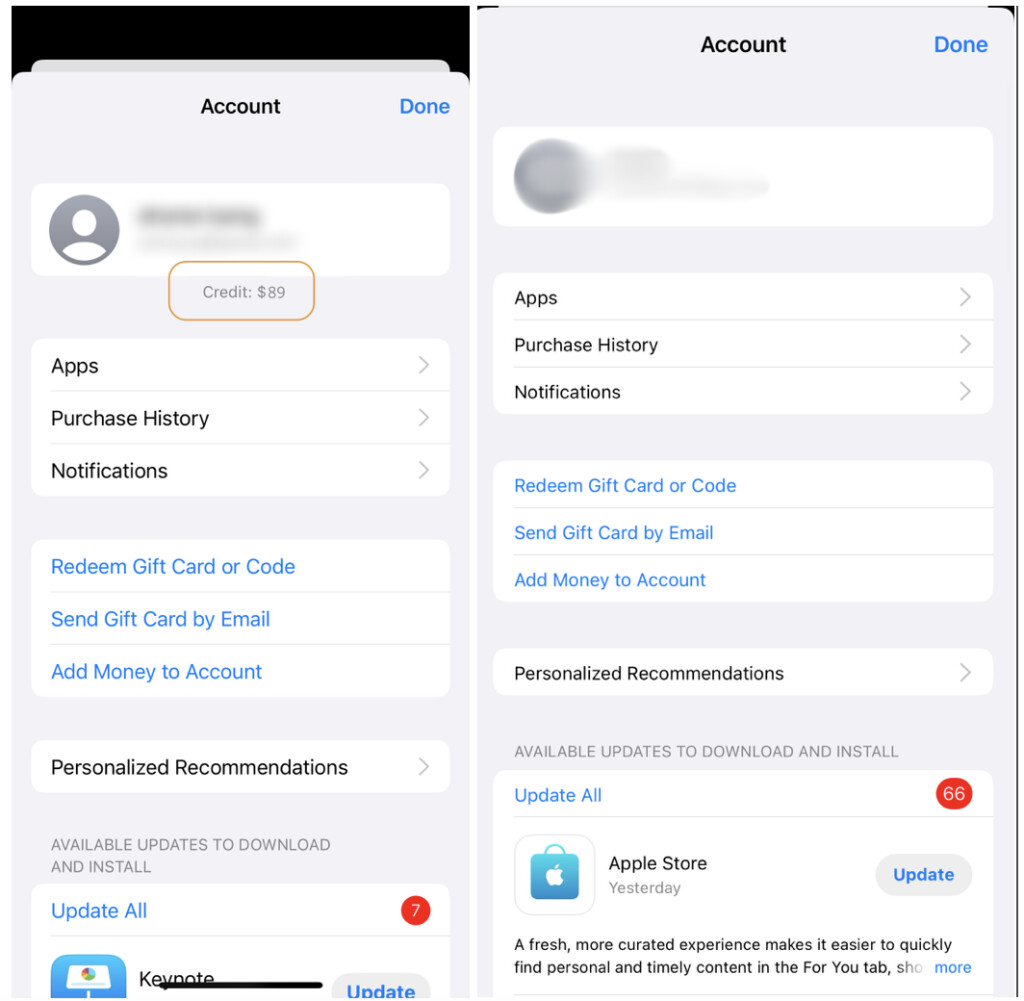
- Make sure you have no balance on your Apple ID.
- Cancel all active subscriptions to avoid automatic charges.
How to check your balance:
- Open the App Store.
- Tap on your Apple ID at the top.
- Check if there are funds in your account.
- If there are — spend them or contact Apple Support.
Tip: if you’re logged in on multiple devices with the same Apple ID, it’s enough to check the balance on one of them.
How to cancel subscriptions:
- Open Settings.
- Tap on Apple ID.
- Select Subscriptions.
- Cancel active subscriptions.
How to change your region:
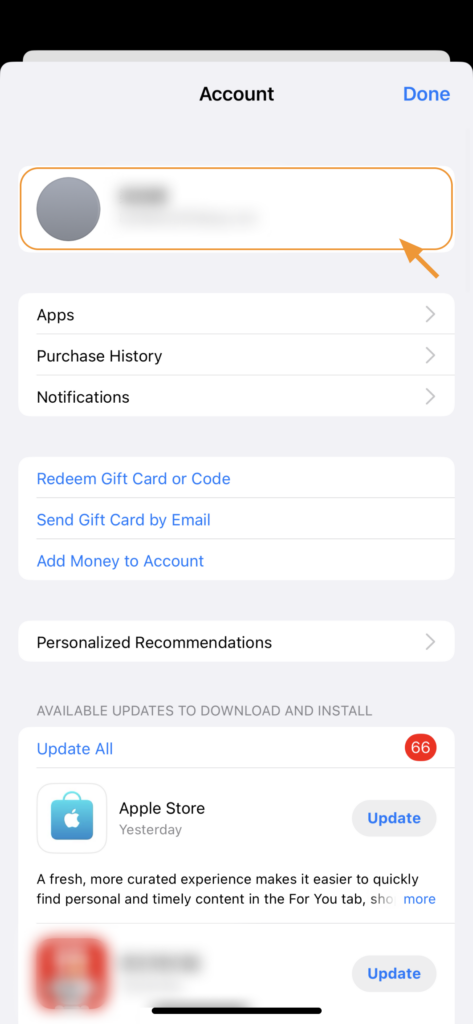
- Go to the App Store and tap on your Apple ID.
- Tap on your account again.
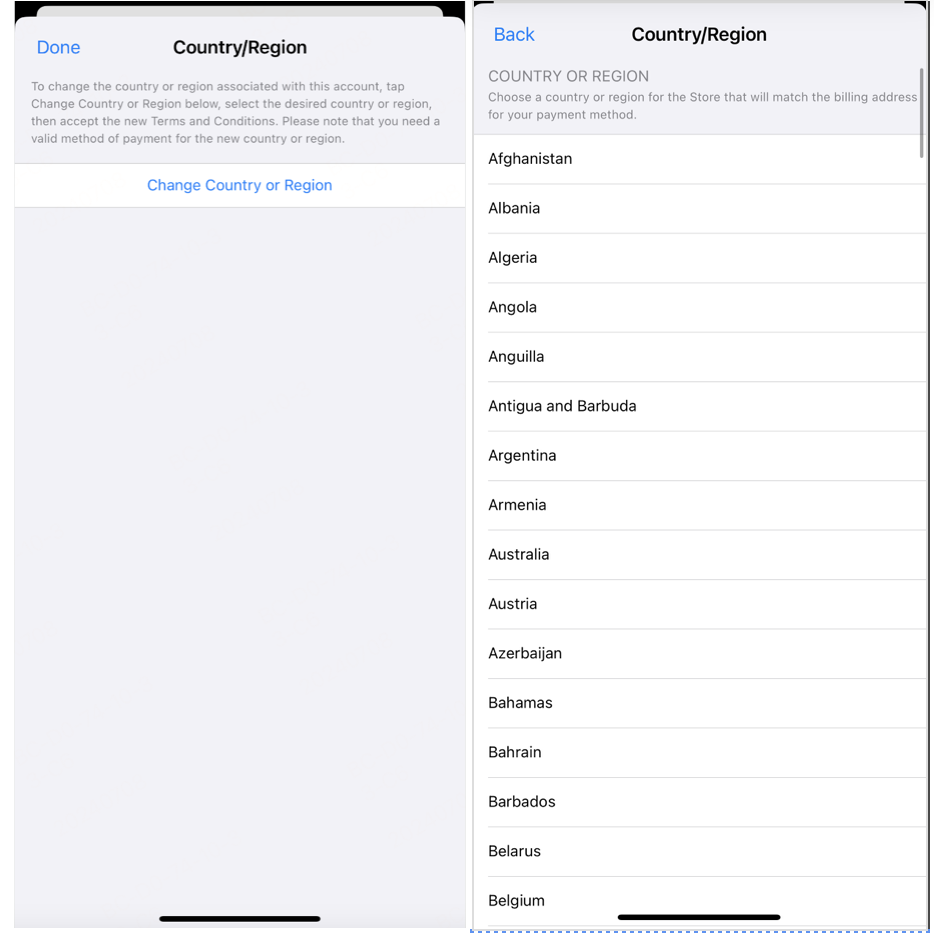
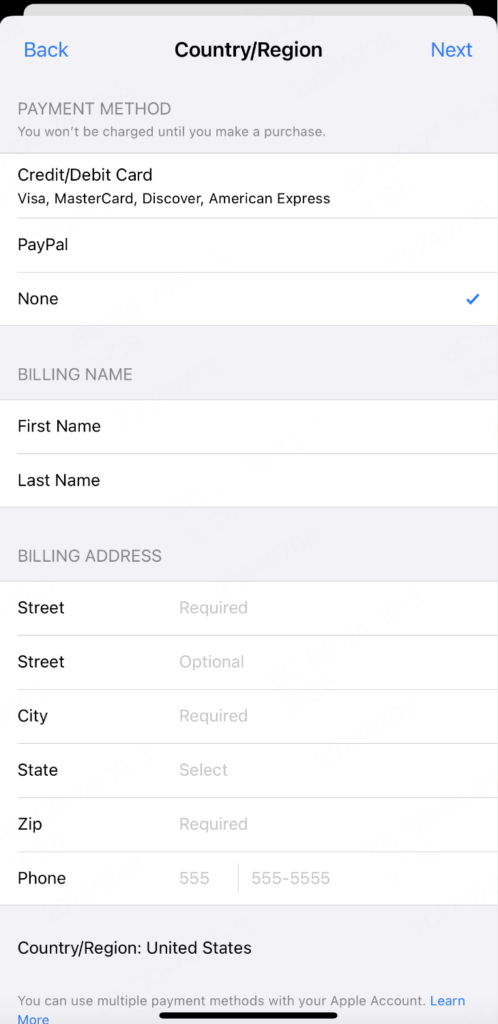
- Select “Country/Region” and choose a new region where apps are available for download.
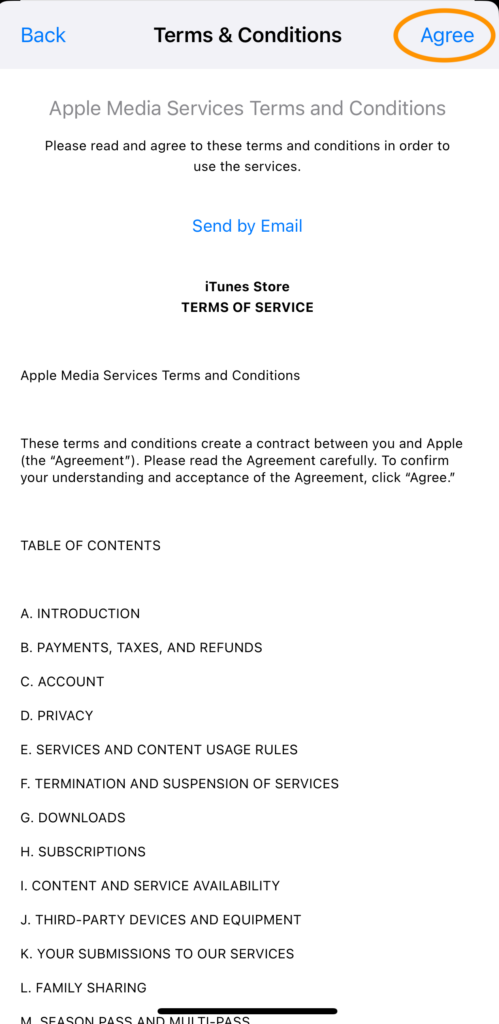
- Accept the terms.
- Provide payment information. For free apps, you can select “None”.
- Enter any valid address in the selected country (for example, the nearest Starbucks).
- Tap “Next”.
Done! Your region has been changed, and now you can download any apps that were previously unavailable, including TikTok, Instagram, and others.
Creating a new Apple ID with a different region
If you don’t want to lose access to active subscriptions, create a new account.
How to create a new Apple ID:
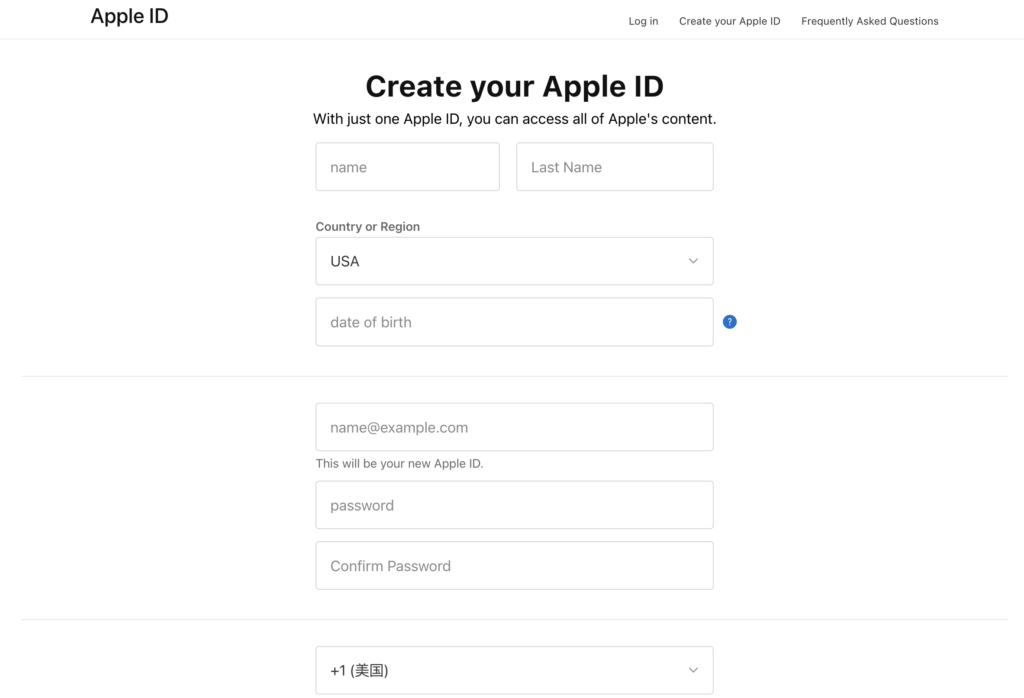
- Go to https://appleid.apple.com/account
- Provide your name, country (the one where the apps you need are available), date of birth, a new email, and phone number.
- Create a strong password.
- Click “Continue”.
How to connect a new account to the App Store:
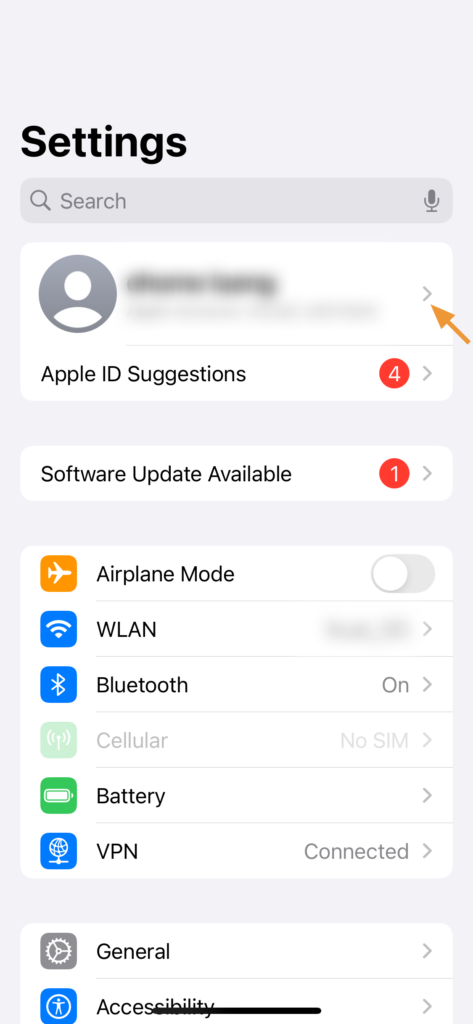
- Go to Settings.
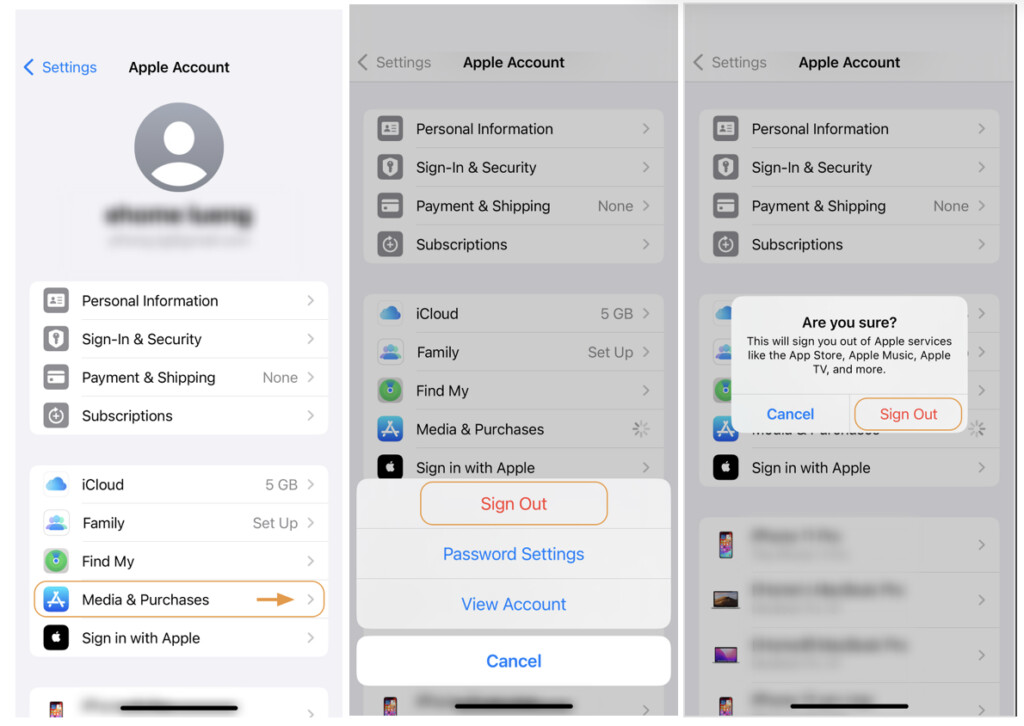
- Tap on Apple ID.
- Go to “Media & Purchases” → “Sign Out”.
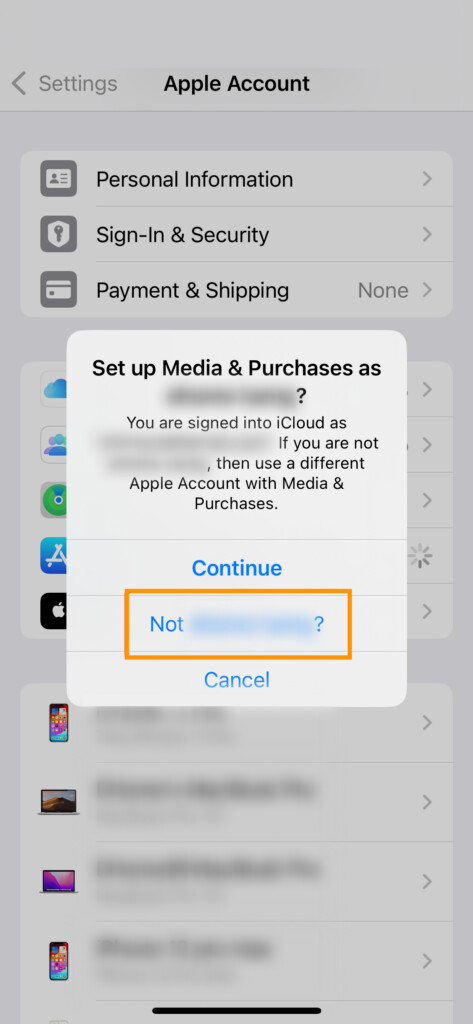
- Tap “Media & Purchases” again → then select “Not your_name?”.
- Enter your new account credentials.
Now you can use one Apple ID for regular use, and the second one solely for downloading the apps you need from another region.
Things to keep in mind
- Some paid features may be unavailable without local payment information.
- Some apps may not work correctly outside their target region — a VPN can help with this.
- To update apps from a different ID, you’ll need to sign back into that account periodically.
How to manage multiple Apple IDs
- Divide your accounts by purpose: one for local use, another for “international” access.
- Don’t forget to switch accounts when performing updates.
- Use a password manager for convenience and security.
If you want to download apps that aren’t available in your region — you already have the solution in your hands. Changing your region or creating an additional account opens access to TikTok, VPN, messengers, and everything else you need. The main thing is to understand how the system works and use it wisely.